Sunday, December 21, 2025

Xmas & New Year's Maps


It's that time of year again in (Norther Hemisphere) winter when year's drawing to an end. Which means it's time for the traditional Christmas Maps blogpost.


Sometimes you hear claims about Santa Claus living at the North Pole (though in Rovaniemi, Finland, I bet they would disagree…). Turns out there's a North Pole near Fairbanks, Alaska as well:


  😄

OK, enough smalltalk… now on to what's happened since the last update (for the GNOME 49 release in September).

Sidebar Redesign

Our old design when it comes to showing information about places has revolved around the trusted old “popover” menu design which has served us pretty well. But it also had it's drawbacks.

For one it was never a good fit on small screen sizes (such as on phones). Therefore we had our own “home-made” place bar design with a separate dialog opening up when clicking the bar to reveal full details.

After some discussions and thinking about this, I decided to try out a new approach utilizing the MultiLayout component from libadwaita which gives the option to get an adaptive “auxillary view” widget which works as a sidebar on desktop, and a bottom sheet on mobile.

Now the routeplanner and place information views have both been consolidated to both reside in this new widget.

 Clicking the route button will now open the sidebar showing the routeplanner, or the bottom sheet depending on the mode.

And clicking a place icon on the map, or selecting a search result will open the place information, also showing in the sidebar, or bottom sheet. 

Route planner showing in sidebar in desktop mode

Routeplanner showing in bottom sheet in mobile/narrow mode

Routeplanner showing public transit itineraries in bottom sheet

Showing place information in sidebar in desktop mode

Showing place information in bottom sheet in mobile mode

 Redesigning Public Transit Itinerary Rendering

The displaying of public transit itineraries has also seen some overhaul.

First I did a bit of redesign of the rows representing journey legs, taking some queues from the Adwaita ExpanderRow style. Improving a bit compared to the old style which had been carried over from GTK 3.

List of journey legs, with the arrow indicating possibilty to expand to reveal more information


List of journey legs, with one leg “expanded” to show intermediate stops made by a train


Improving further on this Jalen Ng contributed a merge request implementing an improvement to the overview list utilizing Adwaita WrapBoxes to show more complete information the different steps of each presented itinerary option in the overview when searching for travel options with public transit.

Showing list of transit itineraries each consisting of multiple journey legs

 Jalen also started a redesign of rendering of itineraries (this merge request is still being worked on).

Redesign of transit itinerary display. Showing each leg as a “track segment“ using the line's color

 Hide Your Location

We also added the option to hide the marker showing your own location. One use for this e.g. if you want to make screenshots without revealing your exact location.

Menu to toggle showing your location marker

 And that's not All…

On top of this some other things. James Westman added support global-state expressions to libshumate's vector tile implementation. This should allow us to e.g. refactor the implementation of light and dark styles and language support in our map style without “recompiling”  the stylesheet at runtime.

James also fixed a bug sometimes causing the application to freeze when dragging the window between screens when a route is being displayed.

This fix has been backported to the 49.3 and 48.8 releases which has been tagged today as an early holiday gift.

And that's all for now, merry holidays, and  happy new year!

Tuesday, September 9, 2025

Maps and GNOME 49

As time is approaching the release of GNOME 49, I thought I should probably put together a small recap post covering some of the new things in Maps. 


 Metro Station Symbols

 The map style now supports showing localized symbols for rail- and metro stations (relying on places being tagged with reference to the networks' entry in Wikidata.

"T" Subway symbols in Boston

S-Bahn symbol in Berlin

"T" metro symbols in Stockholm

 Highway Symbols in Place Details

 The existing code for showing custom highways shields in the map view (based on code from the OpenStreetMap Americana project) has been extended to expose the necessary bits to use it more generally as icon surfaces in a GtkImage widget. So now custom shields are shown in place details when clicking on a road label.

Showing place details for Södertäljevägen, E4 - E20 concurrency

Showing place details for Richmond-San Rafael Bridge in San Francisco

 Adwaita Shortcuts Dialog

The keyboard shortcuts help dialog was ported by Maximiliano to use AdwShortcutsDialog, improving adaptivity.


Keyboard shortcuts help

 Showing OSM Account Avatars in OSM Account Dialog

If a user has set up OAuth for an OpenStreetMap account, and has set a personal profile picture in their OSM account this is now shown in place of the generic „face“ icon.

OpenStreetMap account dialog

 And speaking of editing points-of-interests, the edit dialog has been compacted a bit to better accomodate smaller screen sizes.

POI editing in mobile mode

 This screenshot also showcases the (fairly) new mobile form-factor emulation option in the GTK inspector.


Softer Labels

Some smaller adjustments has also been made to the map style, such as using slightly softer color for the place labels for towns and cities rather than pitch black (or bright white for dark mode).


 Marker Alignments

Thanks to work done by Corentin Noël for libshumate 1.5, the center point for map markers can now be adjusted.

This means the place markers in Maps can now actually point to the actually coordinate (e.g. having the “tip of the needle” at the actual location).

Showing place details for Branderslev

 Updating the Highway Shields Defintions

And finally of the last changes before the release was updating the definition for custom highway shields from OpenStreetMap Americana. So now, among others we support shields for national and regional highways in Argentina.

Highway shields in Argentina

And that's some of the highlights from the 49 release cycle!
 

Wednesday, June 18, 2025

Midsommer Maps

 As tradition has it, it's about time for the (Northern Hemisphere) summer update on the happenings around Maps!

About dialog for GNOME Maps 49.alpha development 


Bug Fixes 

 Since the GNOME 48 release in March, there's been some bug fixes, such as correctly handling daylight savings time in public transit itineraries retrieved from Transitous. Also James Westman fixed a regression where the search result popover wasn't showing on small screen devices (phones) because of sizing issues.


More Clickable Stuff

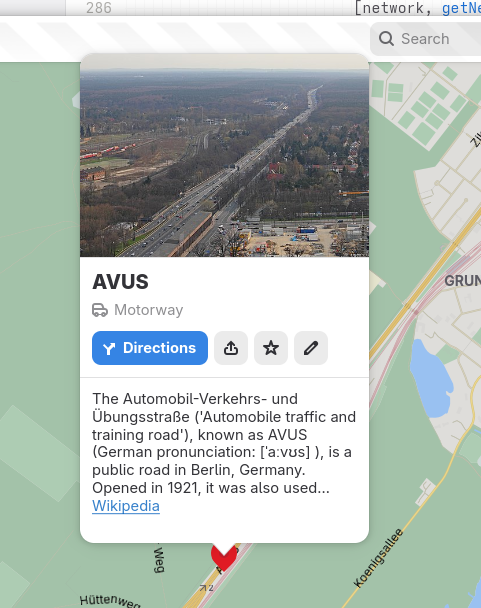
More symbols can now be directly selected in the map view by clicking/tapping on there symbols, like roads and house numbers (and then also, like any other POI can be marked as favorites).
 
Showing place information for the AVUS motorway in Berlin

 And related to traffic and driving, exit numbers are now shown for highway junctions (exits) when available.
 
Showing information for a highway exit in a driving-on-the-right locallity

Showing information for a highway exit in a driving-on-the-left locallity

 Note how the direction the arrow is pointing depends on the side of the road vehicle traffic drives in the country/territoy of the place…
Also the icon for the “Directions” button shows a “turn off left” mirrored icon now for places in drives-on-the-left countries as an additional attention-to-detail.
 

Furigana Names in Japanese

Since some time (around when we re-designed the place information “bubbles”) we show the native name for place under the name translated in the user's locale (when they are different).
As there exists an established OpenStreetMap tag for phonetic names in Japanese (using Hiragana), name:ja-Hira akin to Furigana (https://en.wikipedia.org/wiki/Furigana) used to aid with pronounciation of place names. I had been thinking that it might be a good idea to show this when available as the dimmed supplimental text in the cases where the displayed name and native names are identical, and the Hiragana name is available. E.g. when the user's locale is Japanese and looking at Japanese names.  For other locales in these cases the displayed name would typically be the Romaji name with the Japanese full (Kanji) name displayed under it as the native name.
So, I took the opportunity to discuss this with my college Daniel Markstedt, who speaks fluent Japanese and has lived many years in Japan. As he like the idea, and demo of it, I decided to go ahead with this!
 
Showing a place in Japanese with supplemental Hiragana name


Configurable Measurement Systems

Since like the start of time, Maps has  shown distances in feet and miles when using a United States locale (or more precisely when measurements use such a locale, LC_MEASUREMENT when speaking about the environment variables). For other locales using standard metric measurements.
Despite this we have several times recieved bug reports about Maps not  using the correct units. The issue here is that many users tend to prefer to have their computers speaking American English.
So, I finally caved in and added an option to override the system default.
 
Hamburger menu

 
Hamburger menu showing measurement unit selection

Station Symbols

One feature I had been wanted to implement since we moved to vector tiles and integrated the customized highway shields from OpenStreeMap Americana is showing localized symbols for e.g. metro stations. Such as the classic “roundel” symbol used in London, and the ”T“ in Stockholm.
 
After adding the network:wikidata tag to the pre-generated vector tiles this has been possible to implement. We choose to rely on the Wikidata tag instead of the network name/abbreviations as this is more stable and names could risk getting collitions with unrelated networks having the same (short-) name.
 
U-Bahn station in Hamburg

Metro stations in Copenhagen

Subway stations in Boston

S-Bahn station in Berlin  

 
 This requires the stations being tagged consitently to work out. I did some mass tagging of metro stations in Stockholm, Oslo, and Copenhagen. Other than that I mainly choose places where's at least partial coverage already.
 
If you'd like to contribute and update a network with the network Wikidata tag, I prepared to quick steps to do such an edit with the JOSM OpenStreetMap desktop editor.
 
Download a set of objects to update using an Overpass query, as an example, selecting the stations of Washing DC metro
 
[out:xml][timeout:90][bbox:{{bbox}}];

(

     nwr["network"="Washington Metro"]["railway"="station"];

     );

    (._;>;);

    out meta;


JOSM Overpass download query editor  

 Select the region to download from

Select region in JOSM


Select to only show the datalayer (not showing the background map) to make it easier to see the raw data.

Toggle data layers in JOSM

 Select the nodes.

Show raw datapoints in JSOM


Edit the field in the tag edit panel to update the value for all selected objects

Showing tags for selected objects

Note that this sample assumed the relevant station node where already tagged with network names (the network tag). Other queries to limit selection might be needed.

Also it could also be a good idea to reach out to local OSM communities before making bulk edits like this (e.g. if there is no such tagging at all in specific region) to make sure it would be aliged with expectations and such.

Then it will also potentially take a while before it gets include in out monthly vector tile  update.

When this has been done, given a suitable icon is available as e.g. public domain or commons in WikimediaCommons, it could be bundled in data/icons/stations and a definition added in the data mapping in src/mapStyle/stations.js.


And More…

One feature that has been long-wanted is the ability to dowload maps for offline usage. Lately precisely this is something James Westman has been working on.

It's still an early draft, so we'll see when it is ready, but it already look pretty promising.


Showing the new Preferences option  


Preference dialog with dowloads

Selecting region to download

 
Entering a name for a downloaded region


Dialog showing dowloaded areas


And that's it for now! 


Wednesday, March 12, 2025

Maps and GNOME 48


In a few days it's time for the GNOME 48 release.

So it's time to make a wrap-up with the last changes in Maps for the next release.

 Redesigned Route Markers

One issue that has been addressed was that the old markers we used to mark the start and end locations for routes, being filled and hollow circle icons respectively could be hard to tell apart and actually see which is which.
 
So now to mark the start we show a marker containing the icon representing the mode of transportation.


 The “walk” icon is also used for start of “walking legs” in public transit iteneraries, so this way it's getting a more consistent look.
 

 Redesigned User Location Marker

This was already covered in an earlier blog post, but it might be worth mentioning especially now that we once again have WiFi- and Celltower-based positioning again thanks to BeaconDB (it's already enabled by default in Fedora 41, and I think some other distros as well). We now have the redesigned location marker, using the system accent color.


Transitous Public Transit Routing Migrated to new API

Furthermore the Transitous support has been migrated to the MOTIS 2-based API. This has also been backported to the 47.x releases (as the old API has been retired).
Also public transit routing in Finland will start using Transitous from 48. As Digitransit has slated the retirement of their old OpenTripPlanner 1.x-based API from late April it seemed appropriate to start using Transitous for that region now.
 

Transitous Talk at FOSDEM 2025

When mentioning Transitous I also want to mention that the recording of mine, Felix Gündling's, and Jonah Brüchert's FOSDEM talk around Transitous is now available at:
 

So, please enjoy this, and all the other improvements in GNOME 48 when you grab it! 😎